

Configuring parameter values
You must be a database or organization administrator to modify these settings.- From the PlanetScale organization dashboard, select the desired database
- Navigate to the Clusters page from the menu on the left
- Choose the branch whose parameters you’d like to configure in the “Branch” dropdown
- Select the Parameters tab
- Search for a specific parameter or scroll through the page to see all configurable parameters
- Update the value for the parameter(s) you wish to adjust
- Click “Queue parameter changes”
- Once you’re ready to apply the changes, click “Apply changes”
Configuring parameters with the CLI
You can also inspect and update parameters with the PlanetScale CLI:--internal=false flag excludes internal parameters, which cannot be changed.
Parameters are addressed as namespace.name, for example pgconf.max_connections for PostgreSQL
settings or pgbouncer.default_pool_size for PgBouncer settings. See the
branch command reference for all flags.
Tracking changes to parameters
You can click on the “Changes” tab on the Clusters page to view a log of any changes made to your parameter settings. The log will include the settings affected, the original and updated values, status, user that made the changes, start time, and end time.When updating a cluster’s size, some parameters will automatically
be adjusted. Each cluster size is associated with default parameter settings, changing the cluster size will also
update those defaults. The exception to this is if you manually override a default parameter setting. In that case, a
cluster size adjustment will not automatically change that setting.
Parameter change types
PostgreSQL parameter changes fall into two categories based on how they are applied:- Reloadable changes: The parameter can be updated without restarting PostgreSQL, resulting in zero downtime
- Restart-required changes: PostgreSQL requires a cluster restart for the parameter to take effect
Restart behavior for production clusters
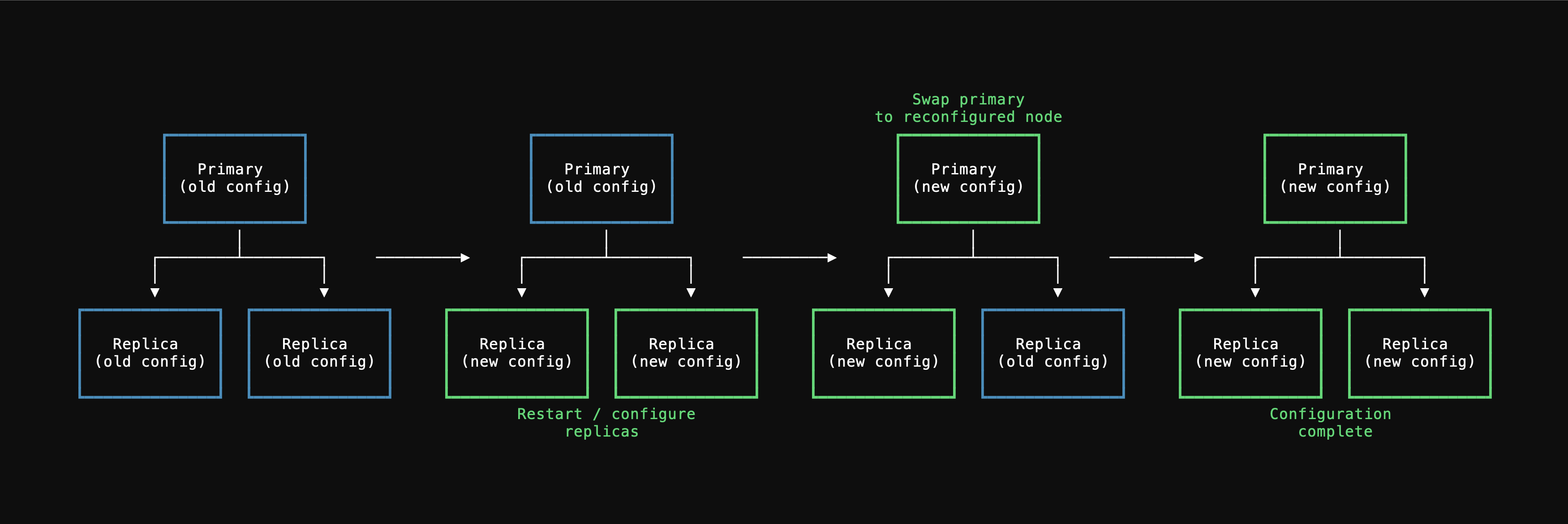
When you apply parameters that require a restart, PlanetScale performs a rolling restart process to minimize downtime:- Configuration changes are first applied to replica instances and they are restarted
- Once replicas are ready, a switchover promotes one replica to become the new primary
- The configuration is applied to the former primary (now a replica) and it is restarted
Number of processes parameter for PgBouncer, PgBouncer connections persist through all parameter changes and do not require reconnection.
Some parameters are required by PostgreSQL to be applied to the primary before replicas, which may result in a slightly longer unavailability period.
Default parameter values
The following table shows the default values for parameters that are displayed by default to customers. You can find additional parameters in the search field.Parameters not in the dashboard
The Parameters tab covers the most common cluster-level settings, but PostgreSQL exposes many more configuration parameters than what appears in the dashboard. If a parameter isn’t listed in the dashboard, that doesn’t mean it can’t be changed — it means it’s typically managed at a different scope. You can set many other PostgreSQL runtime parameters directly via SQL at the session, role, or database level using standard PostgreSQL commands:-
Session — Applies only to the current connection. Resets when the connection closes.
-
Role — Applies to all future sessions for a specific database role. Useful for enforcing defaults per application user.
-
Database — Applies to all future sessions connecting to a specific database.
Common examples
Some frequently useful parameters that can be set via SQL include:idle_in_transaction_session_timeout— Terminates sessions that sit idle inside an open transaction for too long. This is an important safety net for preventing long-lived transactions from holding locks and blocking writes. See also the PgBounceridle_transaction_timeoutsetting for a complementary connection-pooler-level control.statement_timeoutandtransaction_timeout— Bound how long individual queries and transactions can run. See the connection resilience guide for recommended configuration.lock_timeout— Prevents statements from waiting indefinitely to acquire locks. Particularly useful for DDL operations to avoid blocking other queries.application_name— Identifies your application in monitoring tools andpg_stat_activity.
Dashboard parameters are applied at the cluster level and are managed through PlanetScale’s rolling restart process. SQL-level settings (
SET, ALTER ROLE, ALTER DATABASE) operate at a different scope and do not interact with or override cluster-level parameters set in the dashboard. SQL-level settings take precedence for the sessions they apply to.