Service tokens provide an alternate authentication method to be used with the PlanetScale CLI and API. They are typically used in automated scenarios where pscale auth login cannot be used. Service tokens are also required for any calls to the API, as well as minting OAuth tokens for API use.
Create service tokens using the PlanetScale dashboard
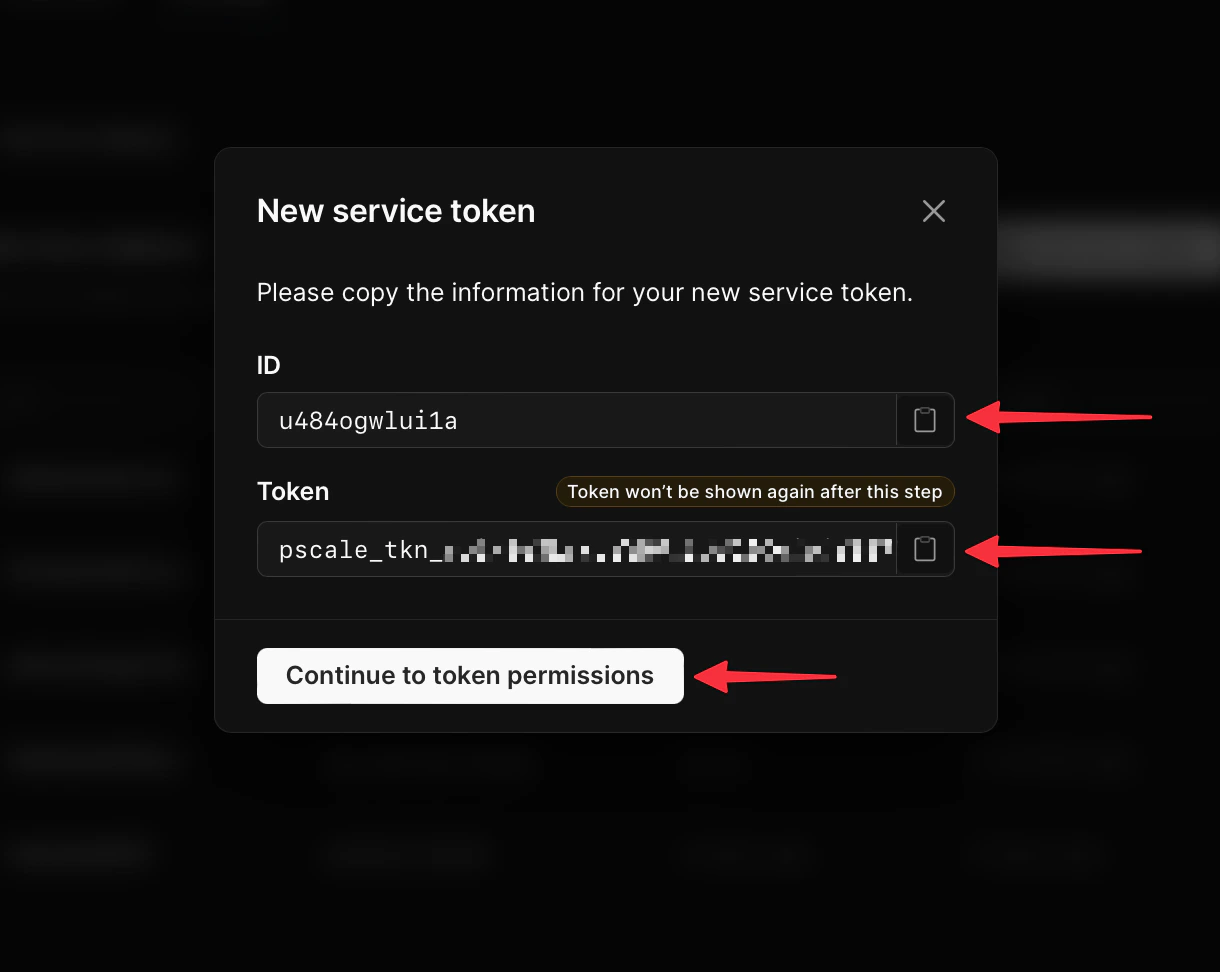
To create a service token using the dashboard, log into your organization, go to the “Settings” > “Service tokens” page, and click the “New service token” button.Give the token a name (this is used for your reference only). You can also optionally set an expiration date for the token — once the expiration date is reached, the token will stop working. Click “Create service token” to proceed.The modal will update, displaying your service token where the Name field was. Copy the ID and token values as you’ll need them moving forward. Click “Edit token permissions” to proceed.
Be sure to copy the service token after you create it. There’s no way to retrieve the token value once you leave this page.
Service tokens are configured with granular permissions, both for the organization that owns them as well as on a per database level. Before you can use a service token, these permissions must be added.
Organization permissions are required when performing operations that are specific to the organization and not for an individual database. To enable a service token for performing these operations, locate the Organization access section and click “Add organization permissions”.In the Organization access permissions modal, check the box next to each of the permission scopes that you want to assign to the token. Click “Save permissions” once finished.For a full list of organization access permissions, see the API documentation for service tokens.
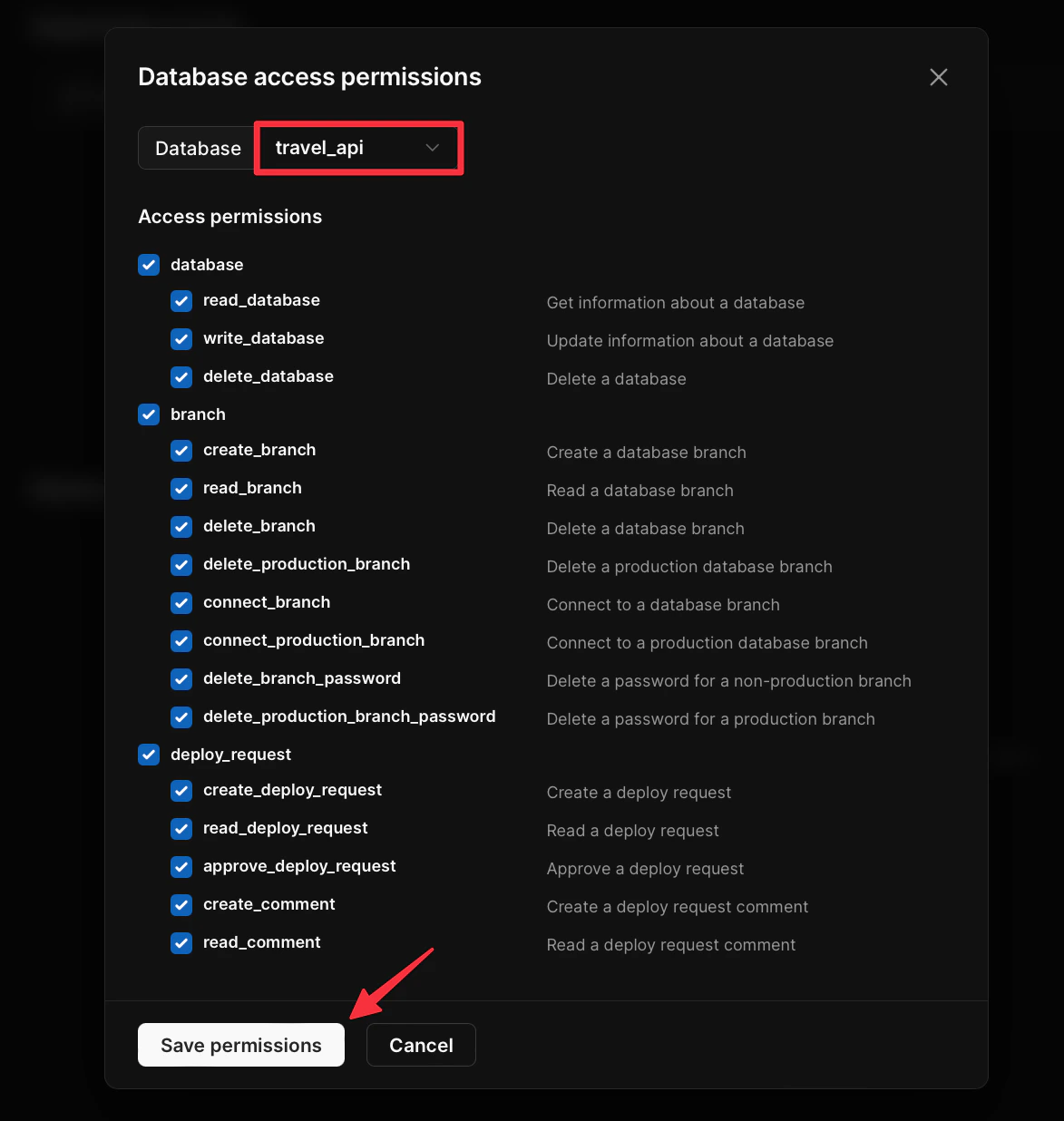
In order to perform operations specific to a database, permissions can be assigned per-database. To do this, locate the section titled Database access and click “Add database access” to open the Database access permissions modal.Select the database you want to grant access to and check the box next to each permission option you need to grant. Once you are done, click “Save permissions”.For a full list of database access permissions, see the API documentation for service tokens.
Organization admins can grant database permissions to all current and future databases. This is available in the Permissions for all databases section.
Any permission added to all databases will not be able to be disabled on an individual basis.
When a database requires administrator approval for deploy requests (located in your database’s Settings page), a service token cannot approve a deploy request created by the same service token. Also, users can’t approve a deploy request created by a service token that they created.
When you execute commands using the PlanetScale CLI, it will automatically parse those values and use them to access the service. However, you’ll also need to pass in your organization name using the --org flag like so:
If you don’t want to set environment variables, you may also pass in the Service Token and Service Token ID by using the --service-token and --service-token-id flags respectively:
In order to execute a request to the PlanetScale API, you’ll need a service token to execute requests directly or for minting OAuth tokens. Both the ID and token are required in the Authorization header without a scheme. Below is an example of how to use a service token to list details about the organizations the token can access:
curl --request GET \
     --url 'https://api.planetscale.com/v1/organizations' \
     --header 'Authorization: <SERVICE_TOKEN_ID>:<SERVICE_TOKEN>'
Refer to the API docs for more details on how to use the API.
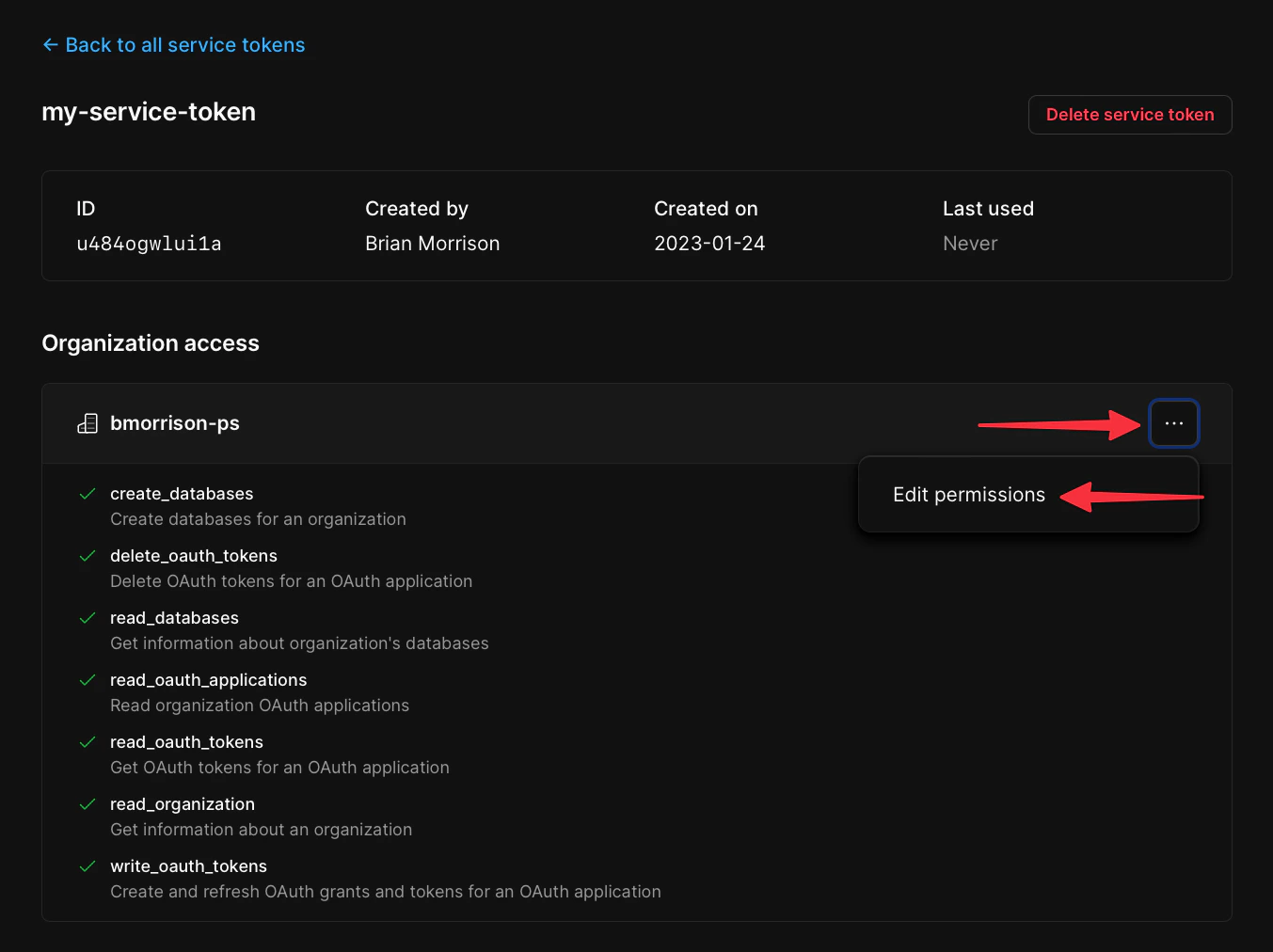
If you want to modify the permissions granted to a service token, start by opening the service token from the settings pane. Select the three dots next to the organization or database name permissions you want to modify and click “Edit permissions”.
This will open a modal that allows you to modify the permissions the service token has to access that organization.
You can add database access permissions to your service token for each database in your organization.To add database access permissions, use the command:
{"docsConfig":{"theme":"aspen","$schema":"https://mintlify.com/docs.json","name":"PlanetScale","description":"PlanetScale is a relational database platform for Vitess, Neki, and Postgres that gives you scale, performance, and reliability without sacrificing developer experience.","colors":{"primary":"#0e73cc","light":"#47b7f8","dark":"#f15817"},"logo":{"light":"https://mintcdn.com/planetscale-2/xUilVHToUFALai8a/logo/light.png?fit=max\u0026auto=format\u0026n=xUilVHToUFALai8a\u0026q=85\u0026s=cccd3c9fc813c01b899ab7af15a115b1","dark":"https://mintcdn.com/planetscale-2/xUilVHToUFALai8a/logo/dark.png?fit=max\u0026auto=format\u0026n=xUilVHToUFALai8a\u0026q=85\u0026s=4153888dc0ef54ddc3464738a2d7ee6e","href":"https://planetscale.com"},"favicon":"https://mintcdn.com/planetscale-2/DJh9Bv1aUZHTVDnK/favicon.svg?fit=max\u0026auto=format\u0026n=DJh9Bv1aUZHTVDnK\u0026q=85\u0026s=cc6ec9d8d0deb3450719bb4b5b6df73a","background":{"color":{"light":"#fafafa","dark":"#111111"}},"navbar":{"links":[{"href":"https://auth.planetscale.com/sign-in","label":"Log in"},{"href":"https://auth.planetscale.com/sign-up","label":"Get started"}],"primary":{"type":"button","label":"Get in touch","href":"https://planetscale.com/contact"}},"footer":{"socials":{"x":"https://twitter.com/planetscale","github":"https://github.com/planetscale","linkedin":"https://www.linkedin.com/company/planetscale","youtube":"https://www.youtube.com/c/PlanetScale","discord":"https://pscale.link/community","facebook":"https://www.facebook.com/planetscaledata"}},"seo":{"metatags":{"canonical":"https://planetscale.com/docs"}},"fonts":{"heading":{"family":"Inter"},"body":{"family":"Inter"}},"integrations":{"segment":{"key":"9Ujczlrndco2w8fcFAakL0FT4bsJCCh3"}},"contextual":{"options":["copy","view","chatgpt","claude","perplexity","mcp","cursor","vscode"],"display":"header"},"styling":{"latex":false},"navigation":{"global":{"anchors":[{"anchor":"Blog","icon":"newspaper","href":"https://planetscale.com/blog"},{"anchor":"Contact Us","icon":"headset","href":"https://planetscale.com/contact"},{"anchor":"Status","icon":"signal","href":"https://www.planetscalestatus.com/"},{"anchor":"Benchmarks","icon":"chart-line","href":"https://planetscale.com/benchmarks"}]},"pages":[]}},"deployment":{"deploymentMetadataValue":{"subdomain":"planetscale-2","hasAudioNarration":false,"actualSubdomain":"planetscale-2","customDomains":["planetscale.com"],"gitSource":{"type":"github","owner":"planetscale","repo":"www","deployBranch":"main","contentDirectory":"content/mintlify/docs","isPrivate":true,"mountPath":"","label":""},"chroma":{"liveDeploymentHistoryId":"6ae505c7cb870de49023cbd6","collectionId":"75c09c64-fefe-4ba5-8569-25281688c6cb","schemaVersion":"v3","latestBuiltDeploymentHistoryId":"6ae505c7cb870de49023cbd6"},"entitlements":{"AI_CHAT":{"status":"ENABLED"},"CONTEXTUAL_FEEDBACK":{"status":"ENABLED"},"CODE_SNIPPET_FEEDBACK":{"status":"ENABLED"},"WEB_MCP":{"status":"ENABLED"},"NARRATION":{"status":"ENABLED"}},"buildId":"6ae50e31004f8cf1ce957135","clientVersion":"0.0.4043","searchFilterCounts":[{"language":"default","tag":"Platform","count":289},{"language":"default","tag":"API Reference","count":268},{"language":"default","tag":"Vitess","count":184},{"language":"default","tag":"Postgres","count":109},{"language":"default","tag":"General API endpoints","count":97},{"language":"default","tag":"Neki","count":58},{"language":"default","tag":"Guides","count":58},{"language":"default","tag":"Vitess API endpoints","count":56},{"language":"default","tag":"Postgres API endpoints","count":51},{"language":"default","tag":"Neki API endpoints","count":50}]},"assistantConfig":{"enableAskAiButton":false,"enableStarterQuestions":false,"enableAskAiSearchBar":true,"deflection":{"enabled":true,"type":"link","url":"https://planetscale.com/contact?initial=support"}},"basePath":"/docs","hasChatPermissions":true,"hasWebMcpPermissions":true,"toggles":[{"name":"kill-isr","enabled":true,"variant":{"name":"disabled","enabled":false,"feature_enabled":true},"impressionData":false},{"name":"agent-mintlify-slack","enabled":true,"variant":{"name":"disabled","enabled":false,"feature_enabled":true},"impressionData":false},{"name":"agent-integrations-settings","enabled":true,"variant":{"name":"disabled","enabled":false,"feature_enabled":true},"impressionData":false},{"name":"automations-pr-grouping","enabled":true,"variant":{"name":"disabled","enabled":false,"feature_enabled":true},"impressionData":false},{"name":"custom-prefix","enabled":true,"variant":{"name":"disabled","enabled":false,"feature_enabled":true},"impressionData":false},{"name":"analytics-v7","enabled":true,"variant":{"name":"disabled","enabled":false,"feature_enabled":true},"impressionData":false},{"name":"user-flows-analytics","enabled":true,"variant":{"name":"disabled","enabled":false,"feature_enabled":true},"impressionData":false},{"name":"no-publish-flow","enabled":true,"variant":{"name":"disabled","enabled":false,"feature_enabled":true},"impressionData":false},{"name":"workos-onboarding","enabled":true,"variant":{"name":"disabled","enabled":false,"feature_enabled":true},"impressionData":false},{"name":"llms-txt-v2","enabled":true,"variant":{"name":"disabled","enabled":false,"feature_enabled":true},"impressionData":false},{"name":"snapshot-serving-live","enabled":true,"variant":{"name":"disabled","enabled":false,"feature_enabled":true},"impressionData":false},{"name":"stripTemperatureMiddleware","enabled":true,"variant":{"name":"disabled","enabled":false,"feature_enabled":true},"impressionData":false},{"name":"support-platform-pylon-zendesk","enabled":true,"variant":{"name":"disabled","enabled":false,"feature_enabled":true},"impressionData":false},{"name":"snapshot-serving","enabled":true,"variant":{"name":"disabled","enabled":false,"feature_enabled":true},"impressionData":false},{"name":"instant-rollback","enabled":true,"variant":{"name":"disabled","enabled":false,"feature_enabled":true},"impressionData":false},{"name":"granular-notifications-server","enabled":true,"variant":{"name":"disabled","enabled":false,"feature_enabled":true},"impressionData":false},{"name":"granular-notifications","enabled":true,"variant":{"name":"disabled","enabled":false,"feature_enabled":true},"impressionData":false},{"name":"automations-fable","enabled":true,"variant":{"name":"disabled","enabled":false,"feature_enabled":true},"impressionData":false},{"name":"fixed-ai-action-pricing","enabled":true,"variant":{"name":"disabled","enabled":false,"feature_enabled":true},"impressionData":false},{"name":"automation-resolve-merge-conflict","enabled":true,"variant":{"name":"disabled","enabled":false,"feature_enabled":true},"impressionData":false},{"name":"scoped-publishing","enabled":true,"variant":{"name":"disabled","enabled":false,"feature_enabled":true},"impressionData":false},{"name":"mintql","enabled":true,"variant":{"name":"disabled","enabled":false,"feature_enabled":true},"impressionData":false},{"name":"page-level-analytics","enabled":true,"variant":{"name":"disabled","enabled":false,"feature_enabled":true},"impressionData":false},{"name":"editor-version-history-v2","enabled":true,"variant":{"name":"disabled","enabled":false,"feature_enabled":true},"impressionData":false},{"name":"billing-page-v2","enabled":true,"variant":{"name":"disabled","enabled":false,"feature_enabled":true},"impressionData":false},{"name":"full-page-search","enabled":true,"variant":{"name":"disabled","enabled":false,"feature_enabled":true},"impressionData":false},{"name":"workspace-projects","enabled":true,"variant":{"name":"disabled","enabled":false,"feature_enabled":true},"impressionData":false},{"name":"assistant-v5","enabled":true,"variant":{"name":"disabled","enabled":false,"feature_enabled":true},"impressionData":false},{"name":"byok-sep-25","enabled":true,"variant":{"name":"disabled","enabled":false,"feature_enabled":true},"impressionData":false},{"name":"fork-pr-previews","enabled":true,"variant":{"name":"disabled","enabled":false,"feature_enabled":true},"impressionData":false},{"name":"revalidation-jwt","enabled":true,"variant":{"name":"disabled","enabled":false,"feature_enabled":true},"impressionData":false},{"name":"vite-origin","enabled":true,"variant":{"name":"disabled","enabled":false,"feature_enabled":true},"impressionData":false},{"name":"billing-updated-9-15","enabled":true,"variant":{"name":"disabled","enabled":false,"feature_enabled":true},"impressionData":false},{"name":"workos-sso-scim","enabled":true,"variant":{"name":"disabled","enabled":false,"feature_enabled":true},"impressionData":false},{"name":"hobby-abuse-scan","enabled":true,"variant":{"name":"disabled","enabled":false,"feature_enabled":true},"impressionData":false},{"name":"dashboard-inbox","enabled":true,"variant":{"name":"disabled","enabled":false,"feature_enabled":true},"impressionData":false},{"name":"workos-signup","enabled":true,"variant":{"name":"disabled","enabled":false,"feature_enabled":true},"impressionData":false},{"name":"turbopuffer-dual-write","enabled":true,"variant":{"name":"disabled","enabled":false,"feature_enabled":true},"impressionData":false},{"name":"workos-enabled","enabled":true,"variant":{"name":"disabled","enabled":false,"feature_enabled":true},"impressionData":false},{"name":"approve-review-flow","enabled":true,"variant":{"name":"disabled","enabled":false,"feature_enabled":true},"impressionData":false}],"googleFontsInlined":false},"customCss":[{"filePath":"style.css","content":"#content-container{column-gap:2rem}.nav-tabs{column-gap:.5em}.nav-tabs-item{padding:0 8px}.eyebrow,.light #navigation-items .text-gray-700,.nav-tabs a{color:#616161}#navigation-items .text-primary,#topbar-cta-button .text-white,#topbar-cta-button svg,.nav-tabs a.text-primary{color:#1a1a1a}.nav-tabs a.text-primary .bg-primary{background-color:#1a1a1a;left:0}.dark .nav-tabs a[href='/docs/vitess'i].text-primary,.nav-tabs a[href='/docs/vitess'i].text-primary{color:#f15817}.dark .nav-tabs a[href='/docs/vitess'i].text-primary .bg-primary,.nav-tabs a[href='/docs/vitess'i].text-primary .bg-primary{background-color:#f15817}.nav-tabs a[href='/docs/postgres'i].text-primary{color:#0e73cc}.nav-tabs a[href='/docs/postgres'i].text-primary .bg-primary{background-color:#0e73cc}.nav-tabs a[href='/docs/neki'i].text-primary{color:#8f7200}.nav-tabs a[href='/docs/neki'i].text-primary .bg-primary{background-color:#8f7200}.dark .nav-tabs a{color:#a1a1a1}.dark #navigation-items .text-primary,.dark .nav-tabs a.text-primary{color:#fafafa}.dark .nav-tabs a.text-primary .bg-primary{background-color:#fafafa}.dark .nav-tabs a[href='/docs/postgres'i].text-primary{color:#47b7f8}.dark .nav-tabs a[href='/docs/postgres'i].text-primary .bg-primary{background-color:#47b7f8}.dark .nav-tabs a[href='/docs/neki'i].text-primary{color:#fbca00}.dark .nav-tabs a[href='/docs/neki'i].text-primary .bg-primary{background-color:#fbca00}.prose:is(.dark *){color:#c1c1c1}.prose :where(a):not(:where([class~='not-prose'], [class~='not-prose'] *)){color:#0e73cc;font-weight:500}.dark .prose :where(a):not(:where(.not-prose, .not-prose *)){color:#47b7f8}.dark .eyebrow{color:#a1a1a1}@media (min-width:1024px){#content-container{padding-top:2rem;padding-right:2rem;padding-left:2.5rem}}#topbar-cta-button a>span{background-color:#fbca00}.group:hover span{opacity:1!important}.bg-primary\\/10{background-color:rgba(129,129,129,.1)}.dark .bg-primary\\/10{background-color:rgba(255,255,255,.1)}body[data-current-path^='/vitess'] svg.bg-primary{background-color:#f15817}body[data-current-path^='/vitess'] .border-primary{border-color:#f15817}body[data-current-path^='/vitess'] #table-of-contents-content .text-primary,body[data-current-path^='/vitess'] .eyebrow{color:#f15817}body[data-current-path^='/vitess'] .card-group a:hover{border-color:#f15817!important}body[data-current-path^='/postgres'] .eyebrow{color:#0e73cc}.dark body[data-current-path^='/postgres'] .eyebrow{color:#47b7f8}body[data-current-path^='/neki'] svg.bg-primary{background-color:#8f7200}body[data-current-path^='/neki'] [data-component-part=card-icon]{background-color:#fbca00}body[data-current-path^='/neki'] [data-component-part=card-icon] svg.bg-primary{background-color:#1a1a1a;transform:scale(.7);transform-origin:center}body[data-current-path^='/neki'] .border-primary{border-color:#8f7200}body[data-current-path^='/neki'] #table-of-contents-content .text-primary{color:#1a1a1a;background-color:transparent;border-color:#fbca00}body[data-current-path^='/neki'] .eyebrow{display:inline-flex;align-items:center;width:fit-content;height:auto;min-height:1.25rem;padding:0 .375rem;color:#1a1a1a;background-color:#fbca00}body[data-current-path^='/neki'] .eyebrow:empty,body[data-current-path^='/neki'] .eyebrow[data-empty]{display:none}.dark body[data-current-path^='/neki'] .card-group .card:hover,body[data-current-path^='/neki'] .card-group .card:hover{--primary:251 202 0;--primary-light:251 202 0;border-color:#fbca00!important}.dark body[data-current-path^='/neki'] [data-component-part=card-icon],.dark body[data-current-path^='/neki'] svg.bg-primary{background-color:#fbca00}.dark body[data-current-path^='/neki'] [data-component-part=card-icon] svg.bg-primary{background-color:#1a1a1a}.dark body[data-current-path^='/neki'] .border-primary{border-color:#fbca00}.dark body[data-current-path^='/neki'] #table-of-contents-content .text-primary{color:#fafafa;background-color:transparent;border-color:#fbca00}.dark body[data-current-path^='/neki'] .eyebrow{color:#1a1a1a;background-color:#fbca00}footer div:last-child{display:none}#header,#pagination a,[data-component-part=card-content-container],[data-component-part=frame-caption]{text-wrap:balance}.step:last-of-type [data-component-part=step-line]{opacity:0}"}],"page":{"pagePath":"cli/service-tokens","slug":"/cli/service-tokens","pageMetadata":{"title":"Service tokens","description":"PlanetScale provides the ability to create service tokens for your PlanetScale organization via the CLI or directly in the UI.","og:image":"images/og/cli/service-tokens.png","href":"/cli/service-tokens"},"description":{"compiledSource":"\"use strict\";\nconst {jsx: _jsx} = arguments[0];\nconst {useMDXComponents: _provideComponents} = arguments[0];\nfunction _createMdxContent(props) {\n const _components = {\n p: \"p\",\n ..._provideComponents(),\n ...props.components\n };\n return _jsx(_components.p, {\n children: \"PlanetScale provides the ability to create service tokens for your PlanetScale organization via the CLI or directly in the UI.\"\n });\n}\nfunction MDXContent(props = {}) {\n const {wrapper: MDXLayout} = {\n ..._provideComponents(),\n ...props.components\n };\n return MDXLayout ? _jsx(MDXLayout, {\n ...props,\n children: _jsx(_createMdxContent, {\n ...props\n })\n }) : _createMdxContent(props);\n}\nreturn {\n default: MDXContent\n};\n","frontmatter":{},"scope":{}},"pageType":"default","mdx":{"mdxSource":{"compiledSource":"\"use strict\";const{Fragment:_Fragment,jsx:_jsx,jsxs:_jsxs}=arguments[0];const{useMDXComponents:_provideComponents}=arguments[0];function _createMdxContent(props){const _components={a:`a`,code:`code`,p:`p`,pre:`pre`,span:`span`,strong:`strong`,..._provideComponents(),...props.components},{CodeBlock,Frame,Heading,OptimizedImage,Tip}=_components;if(!CodeBlock)_missingMdxReference(`CodeBlock`,true);if(!Frame)_missingMdxReference(`Frame`,true);if(!Heading)_missingMdxReference(`Heading`,true);if(!OptimizedImage)_missingMdxReference(`OptimizedImage`,true);if(!Tip)_missingMdxReference(`Tip`,true);return _jsxs(_Fragment,{children:[_jsx(Heading,{level:`2`,id:`overview`,children:`Overview`}),`\n`,_jsxs(_components.p,{children:[`Service tokens provide an alternate authentication method to be used with the PlanetScale CLI and API. They are typically used in automated scenarios where `,_jsx(_components.code,{children:`pscale auth login`}),` cannot be used. Service tokens are also required for any calls to the API, as well as minting OAuth tokens for API use.`]}),`\n`,_jsx(Heading,{level:`2`,id:`create-service-tokens-using-the-planetscale-dashboard`,children:`Create service tokens using the PlanetScale dashboard`}),`\n`,_jsxs(_components.p,{children:[`To create a service token using the dashboard, log into your organization, go to the `,_jsxs(_components.a,{href:`https://app.planetscale.com/~/settings/service-tokens`,children:[_jsx(_components.strong,{children:`“Settings”`}),` > `,_jsx(_components.strong,{children:`“Service tokens”`})]}),` page, and click the `,_jsx(_components.strong,{children:`“New service token”`}),` button.`]}),`\n`,_jsxs(_components.p,{children:[`Give the token a name (this is used for your reference only). You can also optionally set an expiration date for the token — once the expiration date is reached, the token will stop working. Click `,_jsx(_components.strong,{children:`“Create service token”`}),` to proceed.`]}),`\n`,_jsxs(_components.p,{children:[`The modal will update, displaying your service token where the Name field was. Copy the ID and token values as you’ll need them moving forward. Click `,_jsx(_components.strong,{children:`“Edit token permissions”`}),` to proceed.`]}),`\n`,_jsx(Tip,{children:_jsx(_components.p,{children:`Be sure to copy the service token after you create it. There’s no way to retrieve the token value once you leave this page.`})}),`\n`,_jsx(Frame,{children:_jsx(OptimizedImage,{src:`https://mintcdn.com/planetscale-2/GA0k5H-MolPvBjDk/images/assets/docs/concepts/service-tokens/modal-with-service-token-2.png?fit=max\u0026auto=format\u0026n=GA0k5H-MolPvBjDk\u0026q=85\u0026s=1f18f07b836f9395cc035223cfc9e437`,alt:`Service token detail page`,\"data-og-width\":`1220`,width:`1220`,\"data-og-height\":`972`,height:`972`,\"data-path\":`images/assets/docs/concepts/service-tokens/modal-with-service-token-2.png`,\"data-optimize\":`true`,\"data-opv\":`3`,srcset:`https://mintcdn.com/planetscale-2/GA0k5H-MolPvBjDk/images/assets/docs/concepts/service-tokens/modal-with-service-token-2.png?w=280\u0026fit=max\u0026auto=format\u0026n=GA0k5H-MolPvBjDk\u0026q=85\u0026s=6b8b964f7bff6ee8b3f68206d28e0508 280w, https://mintcdn.com/planetscale-2/GA0k5H-MolPvBjDk/images/assets/docs/concepts/service-tokens/modal-with-service-token-2.png?w=560\u0026fit=max\u0026auto=format\u0026n=GA0k5H-MolPvBjDk\u0026q=85\u0026s=ecfb220fc14bee244e969c37b9704bfd 560w, https://mintcdn.com/planetscale-2/GA0k5H-MolPvBjDk/images/assets/docs/concepts/service-tokens/modal-with-service-token-2.png?w=840\u0026fit=max\u0026auto=format\u0026n=GA0k5H-MolPvBjDk\u0026q=85\u0026s=d17f2534fd5226b7ba759437917f29d7 840w, https://mintcdn.com/planetscale-2/GA0k5H-MolPvBjDk/images/assets/docs/concepts/service-tokens/modal-with-service-token-2.png?w=1100\u0026fit=max\u0026auto=format\u0026n=GA0k5H-MolPvBjDk\u0026q=85\u0026s=4d69a3882b65409ba250111794e90b24 1100w, https://mintcdn.com/planetscale-2/GA0k5H-MolPvBjDk/images/assets/docs/concepts/service-tokens/modal-with-service-token-2.png?w=1650\u0026fit=max\u0026auto=format\u0026n=GA0k5H-MolPvBjDk\u0026q=85\u0026s=2139e7ed502211c03ca4fa825ac0c1fe 1650w, https://mintcdn.com/planetscale-2/GA0k5H-MolPvBjDk/images/assets/docs/concepts/service-tokens/modal-with-service-token-2.png?w=2500\u0026fit=max\u0026auto=format\u0026n=GA0k5H-MolPvBjDk\u0026q=85\u0026s=9e0549863228c5adf442a450b9632190 2500w`})}),`\n`,_jsx(Heading,{level:`2`,id:`assign-service-token-permissions`,children:`Assign service token permissions`}),`\n`,_jsx(_components.p,{children:`Service tokens are configured with granular permissions, both for the organization that owns them as well as on a per database level. Before you can use a service token, these permissions must be added.`}),`\n`,_jsx(Heading,{level:`3`,id:`add-organization-permissions`,children:`Add organization permissions`}),`\n`,_jsxs(_components.p,{children:[`Organization permissions are required when performing operations that are specific to the organization and not for an individual database. To enable a service token for performing these operations, locate the `,_jsx(_components.strong,{children:`Organization access`}),` section and click `,_jsx(_components.strong,{children:`“Add organization permissions”`}),`.`]}),`\n`,_jsxs(_components.p,{children:[`In the `,_jsx(_components.strong,{children:`Organization access permissions`}),` modal, check the box next to each of the permission scopes that you want to assign to the token. Click `,_jsx(_components.strong,{children:`“Save permissions”`}),` once finished.`]}),`\n`,_jsxs(_components.p,{children:[`For a full list of organization access permissions, see the `,_jsx(_components.a,{href:`https://planetscale.com/docs/api/reference/service-tokens#organization-access-permissions`,children:`API documentation for service tokens`}),`.`]}),`\n`,_jsx(Heading,{level:`3`,id:`add-database-permissions`,children:`Add database permissions`}),`\n`,_jsxs(_components.p,{children:[`In order to perform operations specific to a database, permissions can be assigned per-database. To do this, locate the section titled `,_jsx(_components.strong,{children:`Database access`}),` and click `,_jsx(_components.strong,{children:`“Add database access”`}),` to open the `,_jsx(_components.strong,{children:`Database access permissions`}),` modal.`]}),`\n`,_jsxs(_components.p,{children:[`Select the database you want to grant access to and check the box next to each permission option you need to grant. Once you are done, click `,_jsx(_components.strong,{children:`“Save permissions”`}),`.`]}),`\n`,_jsxs(_components.p,{children:[`For a full list of database access permissions, see the `,_jsx(_components.a,{href:`https://planetscale.com/docs/api/reference/service-tokens#database-access-permissions`,children:`API documentation for service tokens`}),`.`]}),`\n`,_jsx(Frame,{children:_jsx(OptimizedImage,{src:`https://mintcdn.com/planetscale-2/GA0k5H-MolPvBjDk/images/assets/docs/concepts/service-tokens/db-access-permissions-2.png?fit=max\u0026auto=format\u0026n=GA0k5H-MolPvBjDk\u0026q=85\u0026s=2f2a5fae0c095305dc848397de6962a5`,alt:`The Database access permissions modal.`,\"data-og-width\":`1173`,width:`1173`,\"data-og-height\":`1236`,height:`1236`,\"data-path\":`images/assets/docs/concepts/service-tokens/db-access-permissions-2.png`,\"data-optimize\":`true`,\"data-opv\":`3`,srcset:`https://mintcdn.com/planetscale-2/GA0k5H-MolPvBjDk/images/assets/docs/concepts/service-tokens/db-access-permissions-2.png?w=280\u0026fit=max\u0026auto=format\u0026n=GA0k5H-MolPvBjDk\u0026q=85\u0026s=ad8f9989e1ca8119ed52396094a70cbc 280w, https://mintcdn.com/planetscale-2/GA0k5H-MolPvBjDk/images/assets/docs/concepts/service-tokens/db-access-permissions-2.png?w=560\u0026fit=max\u0026auto=format\u0026n=GA0k5H-MolPvBjDk\u0026q=85\u0026s=5e8b89156ee9d79ae8895435ee91cf72 560w, https://mintcdn.com/planetscale-2/GA0k5H-MolPvBjDk/images/assets/docs/concepts/service-tokens/db-access-permissions-2.png?w=840\u0026fit=max\u0026auto=format\u0026n=GA0k5H-MolPvBjDk\u0026q=85\u0026s=254ff3c8ae1a2c66557965739c27f021 840w, https://mintcdn.com/planetscale-2/GA0k5H-MolPvBjDk/images/assets/docs/concepts/service-tokens/db-access-permissions-2.png?w=1100\u0026fit=max\u0026auto=format\u0026n=GA0k5H-MolPvBjDk\u0026q=85\u0026s=7d9a92296e85fb8db95ecb034dee9878 1100w, https://mintcdn.com/planetscale-2/GA0k5H-MolPvBjDk/images/assets/docs/concepts/service-tokens/db-access-permissions-2.png?w=1650\u0026fit=max\u0026auto=format\u0026n=GA0k5H-MolPvBjDk\u0026q=85\u0026s=7f8ecf4e7c026fe61eccf5c47e8fd0f0 1650w, https://mintcdn.com/planetscale-2/GA0k5H-MolPvBjDk/images/assets/docs/concepts/service-tokens/db-access-permissions-2.png?w=2500\u0026fit=max\u0026auto=format\u0026n=GA0k5H-MolPvBjDk\u0026q=85\u0026s=a865a4bfd9b1cbc48b402919149855ae 2500w`})}),`\n`,_jsx(Heading,{level:`3`,id:`add-permissions-for-all-databases`,children:`Add permissions for all databases`}),`\n`,_jsxs(_components.p,{children:[`Organization admins can grant database permissions to all current and future databases. This is available in the `,_jsx(_components.strong,{children:`Permissions for all databases`}),` section.\nAny permission added to all databases will not be able to be disabled on an individual basis.`]}),`\n`,_jsx(Heading,{level:`2`,id:`service-tokens-and-deploy-requests-approvals`,children:`Service tokens and deploy requests approvals`}),`\n`,_jsxs(_components.p,{children:[`When a database requires administrator approval for deploy requests (located in your database’s `,_jsx(_components.strong,{children:`Settings`}),` page), a service token cannot approve a deploy request created by the same service token. Also, users can’t approve a deploy request created by a service token that they created.`]}),`\n`,_jsx(Heading,{level:`2`,id:`use-a-service-token-with-the-planetscale-cli`,children:`Use a service token with the PlanetScale CLI`}),`\n`,_jsx(_components.p,{children:`To use service tokens with the PlanetScale CLI, set the following environment variables in your terminal:`}),`\n`,_jsx(CodeBlock,{filename:``,numberOfLines:`2`,language:`shellscript`,children:_jsx(_components.pre,{className:`shiki shiki-themes github-light-default dark-plus`,style:{backgroundColor:`#ffffff`,\"--shiki-dark-bg\":`#0B0C0E`,color:`#1f2328`,\"--shiki-dark\":`#D4D4D4`},language:`shellscript`,children:_jsxs(_components.code,{language:`shellscript`,numberOfLines:`2`,children:[_jsxs(_components.span,{className:`line`,children:[_jsx(_components.span,{style:{color:`#CF222E`,\"--shiki-dark\":`#569CD6`},children:`export`}),_jsx(_components.span,{style:{color:`#1F2328`,\"--shiki-dark\":`#9CDCFE`},children:` PLANETSCALE_SERVICE_TOKEN`}),_jsx(_components.span,{style:{color:`#CF222E`,\"--shiki-dark\":`#D4D4D4`},children:`=\u003c`}),_jsx(_components.span,{style:{color:`#1F2328`,\"--shiki-dark\":`#9CDCFE`},children:`YOUR_SERVICE_TOKEN`}),_jsx(_components.span,{style:{color:`#CF222E`,\"--shiki-dark\":`#D4D4D4`},children:`>`})]}),`\n`,_jsxs(_components.span,{className:`line`,children:[_jsx(_components.span,{style:{color:`#CF222E`,\"--shiki-dark\":`#569CD6`},children:`export`}),_jsx(_components.span,{style:{color:`#1F2328`,\"--shiki-dark\":`#9CDCFE`},children:` PLANETSCALE_SERVICE_TOKEN_ID`}),_jsx(_components.span,{style:{color:`#CF222E`,\"--shiki-dark\":`#D4D4D4`},children:`=\u003c`}),_jsx(_components.span,{style:{color:`#1F2328`,\"--shiki-dark\":`#9CDCFE`},children:`YOUR_SERVICE_TOKEN_ID`}),_jsx(_components.span,{style:{color:`#CF222E`,\"--shiki-dark\":`#D4D4D4`},children:`>`})]}),`\n`]})})}),`\n`,_jsxs(_components.p,{children:[`When you execute commands using the PlanetScale CLI, it will automatically parse those values and use them to access the service. However, you’ll also need to pass in your organization name using the `,_jsx(_components.code,{children:`--org`}),` flag like so:`]}),`\n`,_jsx(CodeBlock,{filename:``,numberOfLines:`1`,language:`shellscript`,children:_jsx(_components.pre,{className:`shiki shiki-themes github-light-default dark-plus`,style:{backgroundColor:`#ffffff`,\"--shiki-dark-bg\":`#0B0C0E`,color:`#1f2328`,\"--shiki-dark\":`#D4D4D4`},language:`shellscript`,children:_jsxs(_components.code,{language:`shellscript`,numberOfLines:`1`,children:[_jsxs(_components.span,{className:`line`,children:[_jsx(_components.span,{style:{color:`#953800`,\"--shiki-dark\":`#DCDCAA`},children:`pscale`}),_jsx(_components.span,{style:{color:`#0A3069`,\"--shiki-dark\":`#CE9178`},children:` branch`}),_jsx(_components.span,{style:{color:`#0A3069`,\"--shiki-dark\":`#CE9178`},children:` create`}),_jsx(_components.span,{style:{color:`#CF222E`,\"--shiki-dark\":`#D4D4D4`},children:` \u003c`}),_jsx(_components.span,{style:{color:`#0A3069`,\"--shiki-dark\":`#CE9178`},children:`DB_NAM`}),_jsx(_components.span,{style:{color:`#0A3069`,\"--shiki-dark\":`#CE9178`},children:`E`}),_jsx(_components.span,{style:{color:`#CF222E`,\"--shiki-dark\":`#D4D4D4`},children:`>`}),_jsx(_components.span,{style:{color:`#CF222E`,\"--shiki-dark\":`#D4D4D4`},children:` \u003c`}),_jsx(_components.span,{style:{color:`#0A3069`,\"--shiki-dark\":`#CE9178`},children:`BRANCH_NAM`}),_jsx(_components.span,{style:{color:`#0A3069`,\"--shiki-dark\":`#CE9178`},children:`E`}),_jsx(_components.span,{style:{color:`#CF222E`,\"--shiki-dark\":`#D4D4D4`},children:`>`}),_jsx(_components.span,{style:{color:`#0550AE`,\"--shiki-dark\":`#569CD6`},children:` --org`}),_jsx(_components.span,{style:{color:`#CF222E`,\"--shiki-dark\":`#D4D4D4`},children:` \u003c`}),_jsx(_components.span,{style:{color:`#0A3069`,\"--shiki-dark\":`#CE9178`},children:`ORG_NAM`}),_jsx(_components.span,{style:{color:`#0A3069`,\"--shiki-dark\":`#CE9178`},children:`E`}),_jsx(_components.span,{style:{color:`#CF222E`,\"--shiki-dark\":`#D4D4D4`},children:`>`})]}),`\n`]})})}),`\n`,_jsxs(_components.p,{children:[`If you don’t want to set environment variables, you may also pass in the Service Token and Service Token ID by using the `,_jsxs(_components.a,{href:`/cli/service-token`,children:[_jsx(_components.code,{children:`--service-token`}),` and `,_jsx(_components.code,{children:`--service-token-id`}),` flags`]}),` respectively:`]}),`\n`,_jsx(CodeBlock,{filename:``,numberOfLines:`1`,language:`shellscript`,children:_jsx(_components.pre,{className:`shiki shiki-themes github-light-default dark-plus`,style:{backgroundColor:`#ffffff`,\"--shiki-dark-bg\":`#0B0C0E`,color:`#1f2328`,\"--shiki-dark\":`#D4D4D4`},language:`shellscript`,children:_jsxs(_components.code,{language:`shellscript`,numberOfLines:`1`,children:[_jsxs(_components.span,{className:`line`,children:[_jsx(_components.span,{style:{color:`#953800`,\"--shiki-dark\":`#DCDCAA`},children:`pscale`}),_jsx(_components.span,{style:{color:`#0A3069`,\"--shiki-dark\":`#CE9178`},children:` branch`}),_jsx(_components.span,{style:{color:`#0A3069`,\"--shiki-dark\":`#CE9178`},children:` create`}),_jsx(_components.span,{style:{color:`#CF222E`,\"--shiki-dark\":`#D4D4D4`},children:` \u003c`}),_jsx(_components.span,{style:{color:`#0A3069`,\"--shiki-dark\":`#CE9178`},children:`DB_NAM`}),_jsx(_components.span,{style:{color:`#0A3069`,\"--shiki-dark\":`#CE9178`},children:`E`}),_jsx(_components.span,{style:{color:`#CF222E`,\"--shiki-dark\":`#D4D4D4`},children:`>`}),_jsx(_components.span,{style:{color:`#CF222E`,\"--shiki-dark\":`#D4D4D4`},children:` \u003c`}),_jsx(_components.span,{style:{color:`#0A3069`,\"--shiki-dark\":`#CE9178`},children:`BRANCH_NAM`}),_jsx(_components.span,{style:{color:`#0A3069`,\"--shiki-dark\":`#CE9178`},children:`E`}),_jsx(_components.span,{style:{color:`#CF222E`,\"--shiki-dark\":`#D4D4D4`},children:`>`}),_jsx(_components.span,{style:{color:`#0550AE`,\"--shiki-dark\":`#569CD6`},children:` --org`}),_jsx(_components.span,{style:{color:`#CF222E`,\"--shiki-dark\":`#D4D4D4`},children:` \u003c`}),_jsx(_components.span,{style:{color:`#0A3069`,\"--shiki-dark\":`#CE9178`},children:`ORG_NAM`}),_jsx(_components.span,{style:{color:`#0A3069`,\"--shiki-dark\":`#CE9178`},children:`E`}),_jsx(_components.span,{style:{color:`#CF222E`,\"--shiki-dark\":`#D4D4D4`},children:`>`}),_jsx(_components.span,{style:{color:`#0550AE`,\"--shiki-dark\":`#569CD6`},children:` --service-token`}),_jsx(_components.span,{style:{color:`#CF222E`,\"--shiki-dark\":`#D4D4D4`},children:` \u003c`}),_jsx(_components.span,{style:{color:`#0A3069`,\"--shiki-dark\":`#CE9178`},children:`SERVICE_TOKE`}),_jsx(_components.span,{style:{color:`#0A3069`,\"--shiki-dark\":`#CE9178`},children:`N`}),_jsx(_components.span,{style:{color:`#CF222E`,\"--shiki-dark\":`#D4D4D4`},children:`>`}),_jsx(_components.span,{style:{color:`#0550AE`,\"--shiki-dark\":`#569CD6`},children:` --service-token-id`}),_jsx(_components.span,{style:{color:`#CF222E`,\"--shiki-dark\":`#D4D4D4`},children:` \u003c`}),_jsx(_components.span,{style:{color:`#0A3069`,\"--shiki-dark\":`#CE9178`},children:`SERVICE_TOKEN_I`}),_jsx(_components.span,{style:{color:`#0A3069`,\"--shiki-dark\":`#CE9178`},children:`D`}),_jsx(_components.span,{style:{color:`#CF222E`,\"--shiki-dark\":`#D4D4D4`},children:`>`})]}),`\n`]})})}),`\n`,_jsx(Heading,{level:`2`,id:`use-a-service-token-with-the-planetscale-api`,children:`Use a service token with the PlanetScale API`}),`\n`,_jsxs(_components.p,{children:[`In order to execute a request to the PlanetScale API, you’ll need a service token to execute requests directly or for minting OAuth tokens. Both the ID and token are required in the `,_jsx(_components.code,{children:`Authorization`}),` header without a scheme. Below is an example of how to use a service token to list details about the organizations the token can access:`]}),`\n`,_jsx(CodeBlock,{filename:``,numberOfLines:`3`,language:`shellscript`,children:_jsx(_components.pre,{className:`shiki shiki-themes github-light-default dark-plus`,style:{backgroundColor:`#ffffff`,\"--shiki-dark-bg\":`#0B0C0E`,color:`#1f2328`,\"--shiki-dark\":`#D4D4D4`},language:`shellscript`,children:_jsxs(_components.code,{language:`shellscript`,numberOfLines:`3`,children:[_jsxs(_components.span,{className:`line`,children:[_jsx(_components.span,{style:{color:`#953800`,\"--shiki-dark\":`#DCDCAA`},children:`curl`}),_jsx(_components.span,{style:{color:`#0550AE`,\"--shiki-dark\":`#569CD6`},children:` --request`}),_jsx(_components.span,{style:{color:`#0A3069`,\"--shiki-dark\":`#CE9178`},children:` GET`}),_jsx(_components.span,{style:{color:`#CF222E`,\"--shiki-dark\":`#D7BA7D`},children:` \\\\`})]}),`\n`,_jsxs(_components.span,{className:`line`,children:[_jsx(_components.span,{style:{color:`#0550AE`,\"--shiki-dark\":`#569CD6`},children:` --url`}),_jsx(_components.span,{style:{color:`#0A3069`,\"--shiki-dark\":`#CE9178`},children:` 'https://api.planetscale.com/v1/organizations'`}),_jsx(_components.span,{style:{color:`#CF222E`,\"--shiki-dark\":`#D7BA7D`},children:` \\\\`})]}),`\n`,_jsxs(_components.span,{className:`line`,children:[_jsx(_components.span,{style:{color:`#0550AE`,\"--shiki-dark\":`#569CD6`},children:` --header`}),_jsx(_components.span,{style:{color:`#0A3069`,\"--shiki-dark\":`#CE9178`},children:` 'Authorization: \u003cSERVICE_TOKEN_ID>:\u003cSERVICE_TOKEN>'`})]}),`\n`]})})}),`\n`,_jsxs(_components.p,{children:[`Refer to the `,_jsx(_components.a,{href:`/api/reference/getting-started-with-planetscale-api`,children:`API docs`}),` for more details on how to use the API.`]}),`\n`,_jsx(Heading,{level:`2`,id:`modify-service-token-permissions`,children:`Modify service token permissions`}),`\n`,_jsxs(_components.p,{children:[`If you want to modify the permissions granted to a service token, start by opening the service token from the settings pane. Select the three dots next to the organization or database name permissions you want to modify and click `,_jsx(_components.strong,{children:`“Edit permissions”`}),`.`]}),`\n`,_jsx(Frame,{children:_jsx(OptimizedImage,{src:`https://mintcdn.com/planetscale-2/GA0k5H-MolPvBjDk/images/assets/docs/concepts/service-tokens/edit-org-perms-2.png?fit=max\u0026auto=format\u0026n=GA0k5H-MolPvBjDk\u0026q=85\u0026s=2ff592a3bac8993002f800c5b41ad4b0`,alt:`The location of the Edit permissions option for organization permissions.`,\"data-og-width\":`1353`,width:`1353`,\"data-og-height\":`1012`,height:`1012`,\"data-path\":`images/assets/docs/concepts/service-tokens/edit-org-perms-2.png`,\"data-optimize\":`true`,\"data-opv\":`3`,srcset:`https://mintcdn.com/planetscale-2/GA0k5H-MolPvBjDk/images/assets/docs/concepts/service-tokens/edit-org-perms-2.png?w=280\u0026fit=max\u0026auto=format\u0026n=GA0k5H-MolPvBjDk\u0026q=85\u0026s=de468559b21d1de3a9b5ebe17a685ce4 280w, https://mintcdn.com/planetscale-2/GA0k5H-MolPvBjDk/images/assets/docs/concepts/service-tokens/edit-org-perms-2.png?w=560\u0026fit=max\u0026auto=format\u0026n=GA0k5H-MolPvBjDk\u0026q=85\u0026s=c4e0761dcad008ba733deb90d7498a48 560w, https://mintcdn.com/planetscale-2/GA0k5H-MolPvBjDk/images/assets/docs/concepts/service-tokens/edit-org-perms-2.png?w=840\u0026fit=max\u0026auto=format\u0026n=GA0k5H-MolPvBjDk\u0026q=85\u0026s=5780573dc61103c1413c071343ec275c 840w, https://mintcdn.com/planetscale-2/GA0k5H-MolPvBjDk/images/assets/docs/concepts/service-tokens/edit-org-perms-2.png?w=1100\u0026fit=max\u0026auto=format\u0026n=GA0k5H-MolPvBjDk\u0026q=85\u0026s=d7ab59ae612941ac39c690b4ccd2e714 1100w, https://mintcdn.com/planetscale-2/GA0k5H-MolPvBjDk/images/assets/docs/concepts/service-tokens/edit-org-perms-2.png?w=1650\u0026fit=max\u0026auto=format\u0026n=GA0k5H-MolPvBjDk\u0026q=85\u0026s=908fc1f14fd170ed16b57f6be9f4e220 1650w, https://mintcdn.com/planetscale-2/GA0k5H-MolPvBjDk/images/assets/docs/concepts/service-tokens/edit-org-perms-2.png?w=2500\u0026fit=max\u0026auto=format\u0026n=GA0k5H-MolPvBjDk\u0026q=85\u0026s=90cc315d328b832a8f3f1820cef1b4be 2500w`})}),`\n`,_jsx(_components.p,{children:`This will open a modal that allows you to modify the permissions the service token has to access that organization.`}),`\n`,_jsx(Heading,{level:`2`,id:`delete-a-service-token`,children:`Delete a service token`}),`\n`,_jsxs(_components.p,{children:[`You can delete a service token at any time from the service token detail page. Simply click the `,_jsx(_components.strong,{children:`“Delete service token”`}),` button.`]}),`\n`,_jsx(Frame,{children:_jsx(OptimizedImage,{src:`https://mintcdn.com/planetscale-2/GA0k5H-MolPvBjDk/images/assets/docs/concepts/service-tokens/delete-service-token-2.png?fit=max\u0026auto=format\u0026n=GA0k5H-MolPvBjDk\u0026q=85\u0026s=81a02e008e79a793ba15464b09e3b759`,alt:`Delete service token.`,\"data-og-width\":`1361`,width:`1361`,\"data-og-height\":`337`,height:`337`,\"data-path\":`images/assets/docs/concepts/service-tokens/delete-service-token-2.png`,\"data-optimize\":`true`,\"data-opv\":`3`,srcset:`https://mintcdn.com/planetscale-2/GA0k5H-MolPvBjDk/images/assets/docs/concepts/service-tokens/delete-service-token-2.png?w=280\u0026fit=max\u0026auto=format\u0026n=GA0k5H-MolPvBjDk\u0026q=85\u0026s=2d575f146408408ecd14995993f1102c 280w, https://mintcdn.com/planetscale-2/GA0k5H-MolPvBjDk/images/assets/docs/concepts/service-tokens/delete-service-token-2.png?w=560\u0026fit=max\u0026auto=format\u0026n=GA0k5H-MolPvBjDk\u0026q=85\u0026s=6befd7a440764827acd162bc11ebba31 560w, https://mintcdn.com/planetscale-2/GA0k5H-MolPvBjDk/images/assets/docs/concepts/service-tokens/delete-service-token-2.png?w=840\u0026fit=max\u0026auto=format\u0026n=GA0k5H-MolPvBjDk\u0026q=85\u0026s=6821ff07da3452180307f951a930e983 840w, https://mintcdn.com/planetscale-2/GA0k5H-MolPvBjDk/images/assets/docs/concepts/service-tokens/delete-service-token-2.png?w=1100\u0026fit=max\u0026auto=format\u0026n=GA0k5H-MolPvBjDk\u0026q=85\u0026s=dd8a041da990bb1223a2529d7274c124 1100w, https://mintcdn.com/planetscale-2/GA0k5H-MolPvBjDk/images/assets/docs/concepts/service-tokens/delete-service-token-2.png?w=1650\u0026fit=max\u0026auto=format\u0026n=GA0k5H-MolPvBjDk\u0026q=85\u0026s=6e1f63a2a0d680a891318896e7b56651 1650w, https://mintcdn.com/planetscale-2/GA0k5H-MolPvBjDk/images/assets/docs/concepts/service-tokens/delete-service-token-2.png?w=2500\u0026fit=max\u0026auto=format\u0026n=GA0k5H-MolPvBjDk\u0026q=85\u0026s=d7ac5491944cb607a0102bcadbd7c362 2500w`})}),`\n`,_jsx(Heading,{level:`2`,id:`manage-service-tokens-using-the-planetscale-cli`,children:`Manage service tokens using the PlanetScale CLI`}),`\n`,_jsxs(_components.p,{children:[`Service tokens can also be created and managed directly from the `,_jsx(_components.a,{href:`/cli/service-token`,children:`PlanetScale CLI`}),`.`]}),`\n`,_jsx(Heading,{level:`3`,id:`create-a-new-service-token`,children:`Create a new service token`}),`\n`,_jsx(_components.p,{children:`Use the following command to create a service token:`}),`\n`,_jsx(CodeBlock,{filename:``,numberOfLines:`1`,language:`shellscript`,children:_jsx(_components.pre,{className:`shiki shiki-themes github-light-default dark-plus`,style:{backgroundColor:`#ffffff`,\"--shiki-dark-bg\":`#0B0C0E`,color:`#1f2328`,\"--shiki-dark\":`#D4D4D4`},language:`shellscript`,children:_jsxs(_components.code,{language:`shellscript`,numberOfLines:`1`,children:[_jsxs(_components.span,{className:`line`,children:[_jsx(_components.span,{style:{color:`#953800`,\"--shiki-dark\":`#DCDCAA`},children:`pscale`}),_jsx(_components.span,{style:{color:`#0A3069`,\"--shiki-dark\":`#CE9178`},children:` service-token`}),_jsx(_components.span,{style:{color:`#0A3069`,\"--shiki-dark\":`#CE9178`},children:` create`})]}),`\n`]})})}),`\n`,_jsxs(_components.p,{children:[`You can optionally specify a name for the service token using the `,_jsx(_components.code,{children:`--name`}),` flag:`]}),`\n`,_jsx(CodeBlock,{filename:``,numberOfLines:`1`,language:`shellscript`,children:_jsx(_components.pre,{className:`shiki shiki-themes github-light-default dark-plus`,style:{backgroundColor:`#ffffff`,\"--shiki-dark-bg\":`#0B0C0E`,color:`#1f2328`,\"--shiki-dark\":`#D4D4D4`},language:`shellscript`,children:_jsxs(_components.code,{language:`shellscript`,numberOfLines:`1`,children:[_jsxs(_components.span,{className:`line`,children:[_jsx(_components.span,{style:{color:`#953800`,\"--shiki-dark\":`#DCDCAA`},children:`pscale`}),_jsx(_components.span,{style:{color:`#0A3069`,\"--shiki-dark\":`#CE9178`},children:` service-token`}),_jsx(_components.span,{style:{color:`#0A3069`,\"--shiki-dark\":`#CE9178`},children:` create`}),_jsx(_components.span,{style:{color:`#0550AE`,\"--shiki-dark\":`#569CD6`},children:` --name`}),_jsx(_components.span,{style:{color:`#0A3069`,\"--shiki-dark\":`#CE9178`},children:` \"My Token\"`})]}),`\n`]})})}),`\n`,_jsxs(_components.p,{children:[`You can also specify a time to live (TTL) in seconds using the `,_jsx(_components.code,{children:`--ttl`}),` flag. The token will be invalid once the TTL has passed:`]}),`\n`,_jsx(CodeBlock,{filename:``,numberOfLines:`1`,language:`shellscript`,children:_jsx(_components.pre,{className:`shiki shiki-themes github-light-default dark-plus`,style:{backgroundColor:`#ffffff`,\"--shiki-dark-bg\":`#0B0C0E`,color:`#1f2328`,\"--shiki-dark\":`#D4D4D4`},language:`shellscript`,children:_jsxs(_components.code,{language:`shellscript`,numberOfLines:`1`,children:[_jsxs(_components.span,{className:`line`,children:[_jsx(_components.span,{style:{color:`#953800`,\"--shiki-dark\":`#DCDCAA`},children:`pscale`}),_jsx(_components.span,{style:{color:`#0A3069`,\"--shiki-dark\":`#CE9178`},children:` service-token`}),_jsx(_components.span,{style:{color:`#0A3069`,\"--shiki-dark\":`#CE9178`},children:` create`}),_jsx(_components.span,{style:{color:`#0550AE`,\"--shiki-dark\":`#569CD6`},children:` --name`}),_jsx(_components.span,{style:{color:`#0A3069`,\"--shiki-dark\":`#CE9178`},children:` \"My Token\"`}),_jsx(_components.span,{style:{color:`#0550AE`,\"--shiki-dark\":`#569CD6`},children:` --ttl`}),_jsx(_components.span,{style:{color:`#0550AE`,\"--shiki-dark\":`#B5CEA8`},children:` 3600`})]}),`\n`]})})}),`\n`,_jsx(_components.p,{children:`This command will return a service token ID, value, and expiration time (if TTL was specified) for your use.`}),`\n`,_jsx(Heading,{level:`3`,id:`add-database-access-permissions`,children:`Add database access permissions`}),`\n`,_jsx(_components.p,{children:`You can add database access permissions to your service token for each database in your organization.`}),`\n`,_jsx(_components.p,{children:`To add database access permissions, use the command:`}),`\n`,_jsx(CodeBlock,{filename:``,numberOfLines:`1`,language:`shellscript`,children:_jsx(_components.pre,{className:`shiki shiki-themes github-light-default dark-plus`,style:{backgroundColor:`#ffffff`,\"--shiki-dark-bg\":`#0B0C0E`,color:`#1f2328`,\"--shiki-dark\":`#D4D4D4`},language:`shellscript`,children:_jsxs(_components.code,{language:`shellscript`,numberOfLines:`1`,children:[_jsxs(_components.span,{className:`line`,children:[_jsx(_components.span,{style:{color:`#953800`,\"--shiki-dark\":`#DCDCAA`},children:`pscale`}),_jsx(_components.span,{style:{color:`#0A3069`,\"--shiki-dark\":`#CE9178`},children:` service-token`}),_jsx(_components.span,{style:{color:`#0A3069`,\"--shiki-dark\":`#CE9178`},children:` add-access`}),_jsx(_components.span,{style:{color:`#CF222E`,\"--shiki-dark\":`#D4D4D4`},children:` \u003c`}),_jsx(_components.span,{style:{color:`#0A3069`,\"--shiki-dark\":`#CE9178`},children:`SERVICE_TOKEN_I`}),_jsx(_components.span,{style:{color:`#0A3069`,\"--shiki-dark\":`#CE9178`},children:`D`}),_jsx(_components.span,{style:{color:`#CF222E`,\"--shiki-dark\":`#D4D4D4`},children:`>`}),_jsx(_components.span,{style:{color:`#CF222E`,\"--shiki-dark\":`#D4D4D4`},children:` \u003c`}),_jsx(_components.span,{style:{color:`#0A3069`,\"--shiki-dark\":`#CE9178`},children:`ACCESS_PERMISSIO`}),_jsx(_components.span,{style:{color:`#0A3069`,\"--shiki-dark\":`#CE9178`},children:`N`}),_jsx(_components.span,{style:{color:`#CF222E`,\"--shiki-dark\":`#D4D4D4`},children:`>`}),_jsx(_components.span,{style:{color:`#0550AE`,\"--shiki-dark\":`#569CD6`},children:` --database`}),_jsx(_components.span,{style:{color:`#CF222E`,\"--shiki-dark\":`#D4D4D4`},children:` \u003c`}),_jsx(_components.span,{style:{color:`#0A3069`,\"--shiki-dark\":`#CE9178`},children:`DB_NAM`}),_jsx(_components.span,{style:{color:`#0A3069`,\"--shiki-dark\":`#CE9178`},children:`E`}),_jsx(_components.span,{style:{color:`#CF222E`,\"--shiki-dark\":`#D4D4D4`},children:`>`})]}),`\n`]})})}),`\n`,_jsx(_components.p,{children:`For example, to give a service token the ability to create, read, and delete branches on a specific database, use the following command:`}),`\n`,_jsx(CodeBlock,{filename:``,numberOfLines:`1`,language:`shellscript`,children:_jsx(_components.pre,{className:`shiki shiki-themes github-light-default dark-plus`,style:{backgroundColor:`#ffffff`,\"--shiki-dark-bg\":`#0B0C0E`,color:`#1f2328`,\"--shiki-dark\":`#D4D4D4`},language:`shellscript`,children:_jsxs(_components.code,{language:`shellscript`,numberOfLines:`1`,children:[_jsxs(_components.span,{className:`line`,children:[_jsx(_components.span,{style:{color:`#953800`,\"--shiki-dark\":`#DCDCAA`},children:`pscale`}),_jsx(_components.span,{style:{color:`#0A3069`,\"--shiki-dark\":`#CE9178`},children:` service-token`}),_jsx(_components.span,{style:{color:`#0A3069`,\"--shiki-dark\":`#CE9178`},children:` add-access`}),_jsx(_components.span,{style:{color:`#CF222E`,\"--shiki-dark\":`#D4D4D4`},children:` \u003c`}),_jsx(_components.span,{style:{color:`#0A3069`,\"--shiki-dark\":`#CE9178`},children:`SERVICE_TOKEN_I`}),_jsx(_components.span,{style:{color:`#0A3069`,\"--shiki-dark\":`#CE9178`},children:`D`}),_jsx(_components.span,{style:{color:`#CF222E`,\"--shiki-dark\":`#D4D4D4`},children:`>`}),_jsx(_components.span,{style:{color:`#0A3069`,\"--shiki-dark\":`#CE9178`},children:` read_branch`}),_jsx(_components.span,{style:{color:`#0A3069`,\"--shiki-dark\":`#CE9178`},children:` delete_branch`}),_jsx(_components.span,{style:{color:`#0A3069`,\"--shiki-dark\":`#CE9178`},children:` create_branch`}),_jsx(_components.span,{style:{color:`#0550AE`,\"--shiki-dark\":`#569CD6`},children:` --database`}),_jsx(_components.span,{style:{color:`#CF222E`,\"--shiki-dark\":`#D4D4D4`},children:` \u003c`}),_jsx(_components.span,{style:{color:`#0A3069`,\"--shiki-dark\":`#CE9178`},children:`DB_NAM`}),_jsx(_components.span,{style:{color:`#0A3069`,\"--shiki-dark\":`#CE9178`},children:`E`}),_jsx(_components.span,{style:{color:`#CF222E`,\"--shiki-dark\":`#D4D4D4`},children:`>`})]}),`\n`]})})}),`\n`,_jsxs(_components.p,{children:[`A complete list of service token access permissions can be found in the `,_jsx(_components.a,{href:`/api/reference/service-tokens#access-permissions`,children:`PlanetScale API documentation`}),`.`]}),`\n`,_jsx(Heading,{level:`3`,id:`remove-database-access-permissions`,children:`Remove database access permissions`}),`\n`,_jsx(_components.p,{children:`You can also remove database access permissions for a service token.`}),`\n`,_jsx(_components.p,{children:`Use the following command to remove one or more permissions:`}),`\n`,_jsx(CodeBlock,{filename:``,numberOfLines:`1`,language:`shellscript`,children:_jsx(_components.pre,{className:`shiki shiki-themes github-light-default dark-plus`,style:{backgroundColor:`#ffffff`,\"--shiki-dark-bg\":`#0B0C0E`,color:`#1f2328`,\"--shiki-dark\":`#D4D4D4`},language:`shellscript`,children:_jsxs(_components.code,{language:`shellscript`,numberOfLines:`1`,children:[_jsxs(_components.span,{className:`line`,children:[_jsx(_components.span,{style:{color:`#953800`,\"--shiki-dark\":`#DCDCAA`},children:`pscale`}),_jsx(_components.span,{style:{color:`#0A3069`,\"--shiki-dark\":`#CE9178`},children:` service-token`}),_jsx(_components.span,{style:{color:`#0A3069`,\"--shiki-dark\":`#CE9178`},children:` delete-access`}),_jsx(_components.span,{style:{color:`#CF222E`,\"--shiki-dark\":`#D4D4D4`},children:` \u003c`}),_jsx(_components.span,{style:{color:`#0A3069`,\"--shiki-dark\":`#CE9178`},children:`SERVICE_TOKEN_I`}),_jsx(_components.span,{style:{color:`#0A3069`,\"--shiki-dark\":`#CE9178`},children:`D`}),_jsx(_components.span,{style:{color:`#CF222E`,\"--shiki-dark\":`#D4D4D4`},children:`>`}),_jsx(_components.span,{style:{color:`#CF222E`,\"--shiki-dark\":`#D4D4D4`},children:` \u003c`}),_jsx(_components.span,{style:{color:`#0A3069`,\"--shiki-dark\":`#CE9178`},children:`ACCESS_PERMISSIO`}),_jsx(_components.span,{style:{color:`#0A3069`,\"--shiki-dark\":`#CE9178`},children:`N`}),_jsx(_components.span,{style:{color:`#CF222E`,\"--shiki-dark\":`#D4D4D4`},children:`>`}),_jsx(_components.span,{style:{color:`#0550AE`,\"--shiki-dark\":`#569CD6`},children:` --database`}),_jsx(_components.span,{style:{color:`#CF222E`,\"--shiki-dark\":`#D4D4D4`},children:` \u003c`}),_jsx(_components.span,{style:{color:`#0A3069`,\"--shiki-dark\":`#CE9178`},children:`DB_NAM`}),_jsx(_components.span,{style:{color:`#0A3069`,\"--shiki-dark\":`#CE9178`},children:`E`}),_jsx(_components.span,{style:{color:`#CF222E`,\"--shiki-dark\":`#D4D4D4`},children:`>`})]}),`\n`]})})}),`\n`,_jsx(Heading,{level:`3`,id:`delete-a-service-token-2`,children:`Delete a service token`}),`\n`,_jsx(_components.p,{children:`To delete a service token, run the following command:`}),`\n`,_jsx(CodeBlock,{filename:``,numberOfLines:`1`,language:`shellscript`,children:_jsx(_components.pre,{className:`shiki shiki-themes github-light-default dark-plus`,style:{backgroundColor:`#ffffff`,\"--shiki-dark-bg\":`#0B0C0E`,color:`#1f2328`,\"--shiki-dark\":`#D4D4D4`},language:`shellscript`,children:_jsxs(_components.code,{language:`shellscript`,numberOfLines:`1`,children:[_jsxs(_components.span,{className:`line`,children:[_jsx(_components.span,{style:{color:`#953800`,\"--shiki-dark\":`#DCDCAA`},children:`pscale`}),_jsx(_components.span,{style:{color:`#0A3069`,\"--shiki-dark\":`#CE9178`},children:` service-token`}),_jsx(_components.span,{style:{color:`#0A3069`,\"--shiki-dark\":`#CE9178`},children:` delete`}),_jsx(_components.span,{style:{color:`#CF222E`,\"--shiki-dark\":`#D4D4D4`},children:` \u003c`}),_jsx(_components.span,{style:{color:`#0A3069`,\"--shiki-dark\":`#CE9178`},children:`SERVICE_TOKEN_I`}),_jsx(_components.span,{style:{color:`#0A3069`,\"--shiki-dark\":`#CE9178`},children:`D`}),_jsx(_components.span,{style:{color:`#CF222E`,\"--shiki-dark\":`#D4D4D4`},children:`>`})]}),`\n`]})})}),`\n`,_jsx(Heading,{level:`2`,id:`need-help`,children:`Need help?`}),`\n`,_jsxs(_components.p,{children:[`Get help from `,_jsx(_components.a,{href:`https://planetscale.com/contact?initial=support`,children:`the PlanetScale Support team`}),`, or join our\\xA0`,_jsx(_components.a,{href:`https://pscale.link/community`,children:`Discord community`}),` to see how others are using PlanetScale.`]})]})}function MDXContent(props={}){const{wrapper:MDXLayout}={..._provideComponents(),...props.components};return MDXLayout?_jsx(MDXLayout,{...props,children:_jsx(_createMdxContent,{...props})}):_createMdxContent(props)}return{default:MDXContent};function _missingMdxReference(id,component){throw new Error(`Expected `+(component?`component`:`object`)+\" `\"+id+\"` to be defined: you likely forgot to import, pass, or provide it.\")}","frontmatter":{},"scope":{"config":{},"pageMetadata":{"title":"Service tokens","description":"PlanetScale provides the ability to create service tokens for your PlanetScale organization via the CLI or directly in the UI.","og:image":"images/og/cli/service-tokens.png","href":"/cli/service-tokens"}}},"mdxSourceWithNoJs":null},"mdxExtracts":{"tableOfContents":[{"title":"Overview","slug":"overview","depth":2,"children":[]},{"title":"Create service tokens using the PlanetScale dashboard","slug":"create-service-tokens-using-the-planetscale-dashboard","depth":2,"children":[]},{"title":"Assign service token permissions","slug":"assign-service-token-permissions","depth":2,"children":[{"title":"Add organization permissions","slug":"add-organization-permissions","depth":3,"children":[]},{"title":"Add database permissions","slug":"add-database-permissions","depth":3,"children":[]},{"title":"Add permissions for all databases","slug":"add-permissions-for-all-databases","depth":3,"children":[]}]},{"title":"Service tokens and deploy requests approvals","slug":"service-tokens-and-deploy-requests-approvals","depth":2,"children":[]},{"title":"Use a service token with the PlanetScale CLI","slug":"use-a-service-token-with-the-planetscale-cli","depth":2,"children":[]},{"title":"Use a service token with the PlanetScale API","slug":"use-a-service-token-with-the-planetscale-api","depth":2,"children":[]},{"title":"Modify service token permissions","slug":"modify-service-token-permissions","depth":2,"children":[]},{"title":"Delete a service token","slug":"delete-a-service-token","depth":2,"children":[]},{"title":"Manage service tokens using the PlanetScale CLI","slug":"manage-service-tokens-using-the-planetscale-cli","depth":2,"children":[{"title":"Create a new service token","slug":"create-a-new-service-token","depth":3,"children":[]},{"title":"Add database access permissions","slug":"add-database-access-permissions","depth":3,"children":[]},{"title":"Remove database access permissions","slug":"remove-database-access-permissions","depth":3,"children":[]},{"title":"Delete a service token","slug":"delete-a-service-token-2","depth":3,"children":[]}]},{"title":"Need help?","slug":"need-help","depth":2,"children":[]}],"codeExamples":{}},"jsLinks":["/docs/_mintlify/custom/planetscale-2/b155242ec3c4945e/custom.js"],"subdomain":"planetscale-2","siteName":"PlanetScale","title":"Service tokens - PlanetScale","navMaps":{"firstHrefInVersion":{},"firstHrefInLanguage":{}},"lastModified":"2026-02-25T14:12:55.758Z","originalFileLocation":"cli/service-tokens.mdx"},"headHtml":"\u003cscript data-mint-head>(function(){var d=document.documentElement,p=null;if(!p){try{p=localStorage.getItem(\"isDarkMode\")}catch(e){}if(p==='true')p='dark';else if(p==='false')p='light';if(p!=='light'\u0026\u0026p!=='dark'\u0026\u0026p!=='system')p=\"system\"}var r=p==='system'?(matchMedia(\"(prefers-color-scheme: dark)\").matches?'dark':'light'):p;d.classList.remove(r==='dark'?'light':'dark');d.classList.add(r);d.setAttribute(\"data-theme-preference\",p)})();\u003c/script>\u003cmeta data-mint-head name=\"description\" content=\"PlanetScale provides the ability to create service tokens for your PlanetScale organization via the CLI or directly in the UI.\">\u003cmeta data-mint-head name=\"application-name\" content=\"PlanetScale\">\u003cmeta data-mint-head name=\"generator\" content=\"Mintlify\">\u003clink data-mint-head rel=\"icon\" type=\"image/png\" sizes=\"192x192\" href=\"/docs/mintlify-assets/_mintlify/favicons/planetscale-2/_bFyi8IG4CeLblEd/_generated/favicon/android-chrome-192x192.png\" media=\"(prefers-color-scheme: light)\">\u003clink data-mint-head rel=\"apple-touch-icon\" type=\"image/png\" sizes=\"180x180\" href=\"/docs/mintlify-assets/_mintlify/favicons/planetscale-2/_bFyi8IG4CeLblEd/_generated/favicon/apple-touch-icon.png\">\u003clink data-mint-head rel=\"icon\" type=\"image/png\" sizes=\"16x16\" href=\"/docs/mintlify-assets/_mintlify/favicons/planetscale-2/_bFyi8IG4CeLblEd/_generated/favicon/favicon-16x16.png\" media=\"(prefers-color-scheme: light)\">\u003clink data-mint-head rel=\"icon\" type=\"image/png\" sizes=\"32x32\" href=\"/docs/mintlify-assets/_mintlify/favicons/planetscale-2/_bFyi8IG4CeLblEd/_generated/favicon/favicon-32x32.png\" media=\"(prefers-color-scheme: light)\">\u003clink data-mint-head rel=\"shortcut icon\" type=\"image/x-icon\" href=\"/docs/mintlify-assets/_mintlify/favicons/planetscale-2/_bFyi8IG4CeLblEd/_generated/favicon/favicon.ico\" media=\"(prefers-color-scheme: light)\">\u003clink data-mint-head rel=\"icon\" type=\"image/png\" sizes=\"192x192\" href=\"/docs/mintlify-assets/_mintlify/favicons/planetscale-2/_bFyi8IG4CeLblEd/_generated/favicon-dark/android-chrome-192x192.png\" media=\"(prefers-color-scheme: dark)\">\u003clink data-mint-head rel=\"icon\" type=\"image/png\" sizes=\"16x16\" href=\"/docs/mintlify-assets/_mintlify/favicons/planetscale-2/_bFyi8IG4CeLblEd/_generated/favicon-dark/favicon-16x16.png\" media=\"(prefers-color-scheme: dark)\">\u003clink data-mint-head rel=\"icon\" type=\"image/png\" sizes=\"32x32\" href=\"/docs/mintlify-assets/_mintlify/favicons/planetscale-2/_bFyi8IG4CeLblEd/_generated/favicon-dark/favicon-32x32.png\" media=\"(prefers-color-scheme: dark)\">\u003clink data-mint-head rel=\"shortcut icon\" type=\"image/x-icon\" href=\"/docs/mintlify-assets/_mintlify/favicons/planetscale-2/_bFyi8IG4CeLblEd/_generated/favicon-dark/favicon.ico\" media=\"(prefers-color-scheme: dark)\">\u003cmeta data-mint-head property=\"og:title\" content=\"Service tokens - PlanetScale\">\u003cmeta data-mint-head property=\"og:description\" content=\"PlanetScale provides the ability to create service tokens for your PlanetScale organization via the CLI or directly in the UI.\">\u003cmeta data-mint-head property=\"og:site_name\" content=\"PlanetScale\">\u003cmeta data-mint-head property=\"og:url\" content=\"https://planetscale.com/docs/cli/service-tokens\">\u003cmeta data-mint-head property=\"og:type\" content=\"website\">\u003cmeta data-mint-head property=\"og:image\" content=\"https://planetscale-2.mintlify.app/images/og/cli/service-tokens.png\">\u003cmeta data-mint-head property=\"og:image:width\" content=\"1200\">\u003cmeta data-mint-head property=\"og:image:height\" content=\"630\">\u003cmeta data-mint-head name=\"twitter:card\" content=\"summary_large_image\">\u003cmeta data-mint-head name=\"twitter:title\" content=\"Service tokens - PlanetScale\">\u003cmeta data-mint-head name=\"twitter:description\" content=\"PlanetScale provides the ability to create service tokens for your PlanetScale organization via the CLI or directly in the UI.\">\u003cmeta data-mint-head name=\"twitter:image\" content=\"https://planetscale-2.mintlify.app/images/og/cli/service-tokens.png\">\u003cmeta data-mint-head name=\"twitter:image:width\" content=\"1200\">\u003cmeta data-mint-head name=\"twitter:image:height\" content=\"630\">\u003cmeta data-mint-head name=\"msapplication-config\" content=\"/docs/mintlify-assets/_mintlify/favicons/planetscale-2/_bFyi8IG4CeLblEd/_generated/favicon/browserconfig.xml\">\u003cmeta data-mint-head name=\"apple-mobile-web-app-title\" content=\"PlanetScale\">\u003cmeta data-mint-head name=\"msapplication-TileColor\" content=\"#0e73cc\">\u003clink data-mint-head rel=\"canonical\" href=\"https://planetscale.com/docs/cli/service-tokens\">\u003clink data-mint-head rel=\"alternate\" type=\"application/xml\" href=\"/docs/sitemap.xml\">\u003clink data-mint-head rel=\"alternate\" type=\"text/markdown\" href=\"/docs/cli/service-tokens.md\">\u003cscript data-mint-head type=\"application/ld+json\">{\"@context\":\"https://schema.org\",\"@graph\":[{\"@type\":\"Organization\",\"@id\":\"https://planetscale.com/#organization\",\"name\":\"PlanetScale\",\"url\":\"https://planetscale.com\",\"logo\":{\"@type\":\"ImageObject\",\"url\":\"https://mintcdn.com/planetscale-2/xUilVHToUFALai8a/logo/light.png?fit=max\u0026auto=format\u0026n=xUilVHToUFALai8a\u0026q=85\u0026s=cccd3c9fc813c01b899ab7af15a115b1\"}},{\"@type\":\"WebSite\",\"@id\":\"https://planetscale.com/docs#website\",\"name\":\"PlanetScale\",\"url\":\"https://planetscale.com/docs\",\"publisher\":{\"@id\":\"https://planetscale.com/#organization\"}},{\"@type\":\"WebPage\",\"@id\":\"https://planetscale.com/docs/cli/service-tokens#webpage\",\"url\":\"https://planetscale.com/docs/cli/service-tokens\",\"name\":\"Service tokens\",\"description\":\"PlanetScale provides the ability to create service tokens for your PlanetScale organization via the CLI or directly in the UI.\",\"dateModified\":\"2026-02-25T14:12:55.758Z\",\"isPartOf\":{\"@id\":\"https://planetscale.com/docs#website\"},\"breadcrumb\":{\"@id\":\"https://planetscale.com/docs/cli/service-tokens#breadcrumb\"}},{\"@type\":\"BreadcrumbList\",\"@id\":\"https://planetscale.com/docs/cli/service-tokens#breadcrumb\",\"itemListElement\":[{\"@type\":\"ListItem\",\"position\":1,\"name\":\"Using the pscale CLI\",\"item\":\"https://planetscale.com/docs/agent-setup/prompt\"},{\"@type\":\"ListItem\",\"position\":2,\"name\":\"Service tokens\",\"item\":\"https://planetscale.com/docs/cli/service-tokens\"}]},{\"@type\":[\"Article\",\"TechArticle\"],\"@id\":\"https://planetscale.com/docs/cli/service-tokens#article\",\"headline\":\"Service tokens\",\"name\":\"Service tokens\",\"description\":\"PlanetScale provides the ability to create service tokens for your PlanetScale organization via the CLI or directly in the UI.\",\"url\":\"https://planetscale.com/docs/cli/service-tokens\",\"mainEntityOfPage\":{\"@id\":\"https://planetscale.com/docs/cli/service-tokens#webpage\"},\"image\":\"https://planetscale.com/docs/images/og/cli/service-tokens.png\",\"dateModified\":\"2026-02-25T14:12:55.758Z\",\"publisher\":{\"@id\":\"https://planetscale.com/#organization\"},\"isPartOf\":{\"@id\":\"https://planetscale.com/docs#website\"}}]}\u003c/script>\u003cscript data-mint-head type=\"application/ld+json\">{\"@context\":\"https://schema.org\",\"@type\":\"WebSite\",\"name\":\"PlanetScale\",\"creator\":{\"@type\":\"Organization\",\"name\":\"Mintlify\",\"url\":\"https://mintlify.com\"}}\u003c/script>","siteName":"PlanetScale","nav":{"global":{"anchors":[{"anchor":"Blog","icon":"newspaper","href":"https://planetscale.com/blog"},{"anchor":"Contact Us","icon":"headset","href":"https://planetscale.com/contact"},{"anchor":"Status","icon":"signal","href":"https://www.planetscalestatus.com/"},{"anchor":"Benchmarks","icon":"chart-line","href":"https://planetscale.com/benchmarks"}]},"tabs":[{"tab":"Platform","pages":[{"title":"Platform","href":""}]},{"tab":"Vitess","pages":[{"title":"Vitess","href":"/vitess"}]},{"tab":"Neki","pages":[{"title":"Neki","href":"/neki"}]},{"tab":"Postgres","pages":[{"title":"Postgres","href":"/postgres"}]},{"tab":"API Reference","pages":[{"title":"API Reference","href":"/api/reference/getting-started-with-planetscale-api"}]},{"tab":"CLI Reference","groups":[{"group":"Introduction","pages":[{"title":"PlanetScale CLI","sidebarTitle":"CLI overview","href":"/cli"}]},{"group":"Using the pscale CLI","pages":[{"title":"Agent setup prompt","sidebarTitle":"Agent setup prompt","href":"/agent-setup/prompt"},{"title":"PlanetScale CLI commands: agent-guide","sidebarTitle":"agent-guide","href":"/cli/agent-guide"},{"title":"PlanetScale environment set up","sidebarTitle":"Setting up CLI environment","description":null,"href":"/cli/planetscale-environment-setup"},{"title":"Service tokens","href":"/cli/service-tokens"}]},{"group":"CLI command reference","pages":[{"title":"PlanetScale CLI","sidebarTitle":"CLI overview","description":null,"href":"/cli"},{"title":"PlanetScale CLI commands: agent-guide","sidebarTitle":"agent-guide","href":"/cli/agent-guide"},{"title":"PlanetScale CLI commands: api","sidebarTitle":"api","href":"/cli/api"},{"title":"PlanetScale CLI commands: audit log","sidebarTitle":"audit-log","href":"/cli/audit-log"},{"title":"PlanetScale CLI commands: auth","sidebarTitle":"auth","href":"/cli/auth"},{"title":"PlanetScale CLI commands: backup","sidebarTitle":"backup","href":"/cli/backup"},{"title":"PlanetScale CLI commands: billing","sidebarTitle":"billing","href":"/cli/billing"},{"title":"PlanetScale CLI commands: branch","sidebarTitle":"branch","href":"/cli/branch"},{"title":"PlanetScale CLI commands: completion","sidebarTitle":"completion","href":"/cli/completion"},{"title":"PlanetScale CLI commands: connect","sidebarTitle":"connect","href":"/cli/connect"},{"title":"PlanetScale CLI commands: connections","sidebarTitle":"connections","href":"/cli/connections"},{"title":"PlanetScale CLI commands: database","sidebarTitle":"database","href":"/cli/database"},{"title":"PlanetScale CLI commands: deploy-request","sidebarTitle":"deploy-request","href":"/cli/deploy-request"},{"title":"PlanetScale CLI commands: import","sidebarTitle":"import","href":"/cli/import"},{"title":"PlanetScale CLI commands: insights","sidebarTitle":"insights","href":"/cli/insights"},{"title":"PlanetScale CLI commands: inspect","sidebarTitle":"inspect","href":"/cli/inspect"},{"title":"PlanetScale CLI commands: logs","sidebarTitle":"logs","href":"/cli/logs"},{"title":"PlanetScale CLI commands: keyspace","sidebarTitle":"keyspace","href":"/cli/keyspace"},{"title":"PlanetScale CLI commands: maintenance","sidebarTitle":"maintenance","href":"/cli/maintenance"},{"title":"PlanetScale CLI commands: lookup-vindex","sidebarTitle":"lookup-vindex","href":"/cli/lookup-vindex"},{"title":"PlanetScale CLI commands: materialize","sidebarTitle":"materialize","href":"/cli/materialize"},{"title":"PlanetScale CLI commands: metrics","sidebarTitle":"metrics","href":"/cli/metrics"},{"title":"PlanetScale CLI commands: move-tables","sidebarTitle":"move-tables","href":"/cli/move-tables"},{"title":"PlanetScale CLI commands: org","sidebarTitle":"org","href":"/cli/org"},{"title":"PlanetScale CLI commands: password","sidebarTitle":"password","href":"/cli/password"},{"title":"PlanetScale CLI commands: pgbouncer","sidebarTitle":"pgbouncer","href":"/cli/pgbouncer"},{"title":"PlanetScale CLI commands: ping","sidebarTitle":"ping","href":"/cli/ping"},{"title":"PlanetScale CLI commands: planned-reparent-shard","sidebarTitle":"planned-reparent-shard","href":"/cli/planned-reparent-shard"},{"title":"PlanetScale CLI commands: query-patterns","sidebarTitle":"query-patterns","href":"/cli/query-patterns"},{"title":"PlanetScale CLI commands: region","sidebarTitle":"region","href":"/cli/region"},{"title":"PlanetScale CLI commands: role","sidebarTitle":"role","href":"/cli/role"},{"title":"PlanetScale CLI commands: service-token","sidebarTitle":"service-token","href":"/cli/service-token"},{"title":"PlanetScale CLI commands: shell","sidebarTitle":"shell","href":"/cli/shell"},{"title":"PlanetScale CLI commands: signup","sidebarTitle":"signup","href":"/cli/signup"},{"title":"PlanetScale CLI commands: size","sidebarTitle":"size","href":"/cli/size"},{"title":"PlanetScale CLI commands: sql","sidebarTitle":"sql","href":"/cli/sql"},{"title":"PlanetScale CLI commands: traffic-control","sidebarTitle":"traffic-control","href":"/cli/traffic-control"},{"title":"PlanetScale CLI commands: vdiff","sidebarTitle":"vdiff","href":"/cli/vdiff"},{"title":"PlanetScale CLI commands: vtctl","sidebarTitle":"vtctl","href":"/cli/vtctl"},{"title":"PlanetScale CLI commands: webhook","sidebarTitle":"webhook","href":"/cli/webhook"},{"title":"PlanetScale CLI commands: workflow","sidebarTitle":"workflow","href":"/cli/workflow"}]}]}]},"basePath":"","title":"Service tokens - PlanetScale","buildId":"dpl_4RHMRqtvdHvKgaEfTTjFqjzja3B6","deploymentId":"dpl_4RHMRqtvdHvKgaEfTTjFqjzja3B6","dynamics":["07c022d89b","a74be98ba7"],"chunks":["Frame-CSp1VigC.js","DynamicMarkdown-Dnt6YhtR.js","zoom-image-lightbox-CZTaVDTN.js","lightbox-handle-r17bVUz3.js"]}